2. WSL
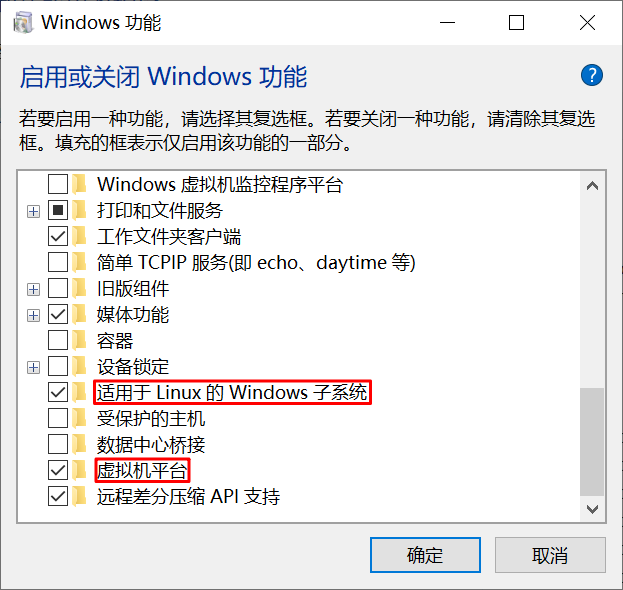
在 Windows 10 上,启用系统组件“虚拟机平台”和“适用于 Linux 的 Windows 子系统”:
$ wsl --version
WSL 版本: 2.5.7.0
内核版本: 6.6.87.1-1
WSLg 版本: 1.0.66
MSRDC 版本: 1.2.6074
Direct3D 版本: 1.611.1-81528511
DXCore 版本: 10.0.26100.1-240331-1435.ge-release
Windows: 10.0.19045.5854
可以通过 Microsoft Store 安装发行版。安装以后:
$ wsl --list
适用于 Linux 的 Windows 子系统分发:
Ubuntu-22.04 (默认值)
直接输入 wsl 进入默认子系统:
$ wsl
Welcome to Ubuntu 22.04.5 LTS (GNU/Linux 4.4.0-19041-Microsoft x86_64)

 * Documentation:  https://help.ubuntu.com
 * Management:     https://landscape.canonical.com
 * Support:        https://ubuntu.com/pro
⋮
更新:
$ wsl --update
正在检查更新。
已安装最新版本的适用于 Linux 的 Windows 子系统。
通过路径 \\wsl.localhost\Ubuntu-22.04\home\xxxx 可访问虚拟机中的目录。